

Instagram, Facebook, and WhatsApp don't tell anyone who visited your profile. Not you, not any other app. So where do the apps that promise the list come from? They guess names based on likes and comments, or ask for your password to log into your account. In neither case do you receive what was promised.
Two social networks do show visitor lists, each with its own rules: LinkedIn and TikTok. Below, you can see what each platform reveals and what to do when an app appears claiming to uncover the rest.
What Each Network Shows About Who Visited Your Profile
The rule is simple: the network decides what to show, and shows it within its own application. None of them release this information to third-party programs. On LinkedIn, knowing who viewed your profile is part of networking, which is why the feature has existed for years.
On Instagram and Facebook, profile visits are private. You only see public signs: who liked, commented, or watched your Stories. Now, network by network.
On LinkedIn, the "Who viewed your profile" feature is native and located on your profile itself. The free account shows a selection of recent visitors; the complete list and longer history are available on LinkedIn Premium.
O LinkedIn It also lets you choose how you appear when you visit someone: with your name and job title, as a semi-private profile, or in private mode. Those browsing in private mode don't appear on anyone's list, which is why some visitors show up without a name.
Instagram doesn't show who visited your profile, and any app that promises otherwise is making it up. The platform does show who watched your Stories during the 24 hours they're live, and who liked or commented on your posts.
"Profile visitor" apps cross-reference these likes and comments and create a ranking. It looks like a list of visits, but it's just a list of who interacts with you the most, something you already see for free in notifications.
Facebook's Help Center is straightforward: the network does not allow you to track who views your profile, and third-party apps also cannot offer this function. If an app says otherwise, it's false.
Extensions and apps that ask you to log in to Facebook to "reveal visitors" often have another purpose: to collect account data or spread scam links to your friends. If you have already granted this permission, remove access in your Facebook Apps and Websites settings and change your password.
TikTok
TikTok is the best-known exception: the "Profile View History" shows who has viewed your profile in the last 30 days. The feature is native, located in the privacy settings, and is only available to users aged 16 or older.
There's a catch: you only see people who have also enabled the option, and people you visit can also see you. If you disable the feature, you'll be removed from other people's lists and stop seeing your own.
The apps that promise the list
Apps that claim to show visitors from any network almost always follow the same script: they ask for your account login, display a blocked list, and charge a subscription to "unlock" the names. When the list does appear, it's made up of random profiles or people who already like your photos.
Giving your password to one of these apps opens the door to account theft and blocking by the network itself, which prohibits automated access by third parties. If you have installed any, uninstall it, change your password, and activate two-step verification.
How to Measure Interest in Your Profile
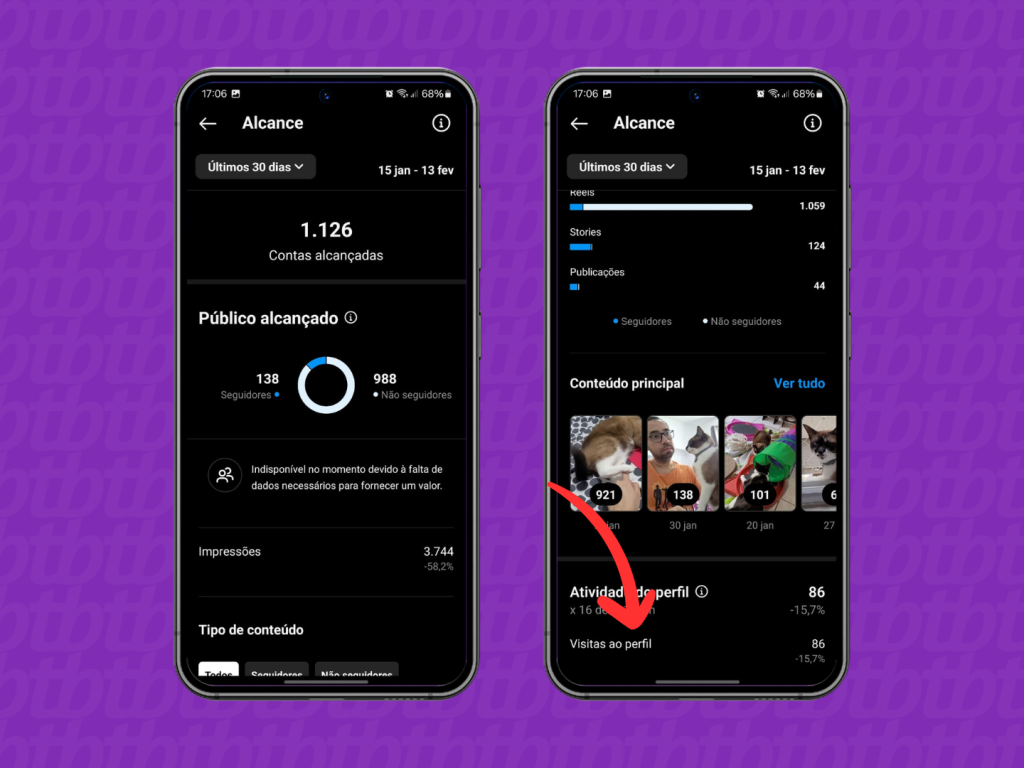
To measure interest in your profile, use the official tools. Professional Instagram and Facebook accounts have statistics dashboards showing reach, profile visits, and link clicks, without revealing names.
On LinkedIn and TikTok, the native feature solves the problem. On other networks, likes, comments, and Story views say more about who follows you than any third-party app.
Conclusion
Discovering who visited your profile is only possible where the network itself allows it: on LinkedIn and TikTok, according to each platform's rules. On Instagram, Facebook, and WhatsApp, this list is not shared with anyone within the app.
Therefore, when an app asks for a password or subscription in exchange for your contact list, close it and move on. Use official resources, protect your account with two-step verification, and invest your time in interacting with those who already engage with you.